Why Do So Many Online Clothes Not Fit Right?
Online fashion has a return rate 3-4 times higher than in-store shopping, and the reason isn't quality. 72% of fashion returns cite "didn't look right" as the primary reason (NRF, 2024). Sizing varies wildly across brands. A size medium from one retailer fits like a small from another. A product photo shot on a model with different proportions tells you almost nothing about how the same piece will look on your body.
Flat images can't convey drape, movement, or how a fabric behaves on a specific body shape. Size guides help, but they require measurements and still involve guesswork. Customer reviews add context but don't give you a visual. The changing room solves all of this instantly. Online shopping just hasn't had an equivalent, until now.
What Does "Virtual Try-On" Actually Mean?
The term covers two genuinely different technologies, and the difference matters for clothing. Understanding which approach an app uses tells you a lot about how accurate the results will be.
AR camera overlay
Augmented reality try-on uses your phone's camera in real time. The app tracks your body landmarks and layers a clothing mesh over your live image. This works well for shoes and accessories, where the geometry is predictable and the item doesn't drape. For clothing, the real-time constraint means the system can't fully simulate how fabric falls, which limits accuracy for anything with movement or structure.
AI image synthesis
[UNIQUE INSIGHT] AI synthesis takes a still photo of you and generates a completely new image showing you wearing the target garment. A diffusion model trained on millions of garment-on-body pairs handles fabric drape, lighting, and body contour in a single processing pass. Because there's no real-time constraint, the output quality is significantly higher for complex fabrics, patterns, and layered garments. For purchase decisions, this approach is more useful.
| Approach | How it works | Good for | Accuracy for clothes |
|---|---|---|---|
| AR overlay | Live camera, real-time | Shoes, glasses, hats | Moderate |
| AI synthesis | Photo upload, generated image | All clothing types | High |
How to Try On Clothes Before Buying Online with Your iPhone (Step by Step)
The fastest way to virtually try on clothes from any store is with Spree on iPhone. The process takes about 90 seconds for a first-time user. Learn more about Spree's AI try-on feature here. Here's exactly how it works:
- 1 Download Spree from the iOS App Store. It's free. No account required to browse, but you'll need one to save items.
- 2 Find a clothing item on any store's website or app. Amazon, ASOS, Zara, H&M, Net-a-Porter, Shein, and 1,000+ others work.
- 3 Save the item to Spree by copying the product URL and pasting it into Spree, or by using the iOS Share Sheet to share directly from Safari or the store's app.
- 4 Open the saved item in your Spree wishlist and tap "Try On."
- 5 Upload your photo. A clear, full-body photo with good lighting and a simple background gives the best result.
- 6 View the result. The AI generates your try-on image in seconds. You can save, share, or go straight to the retailer to buy.
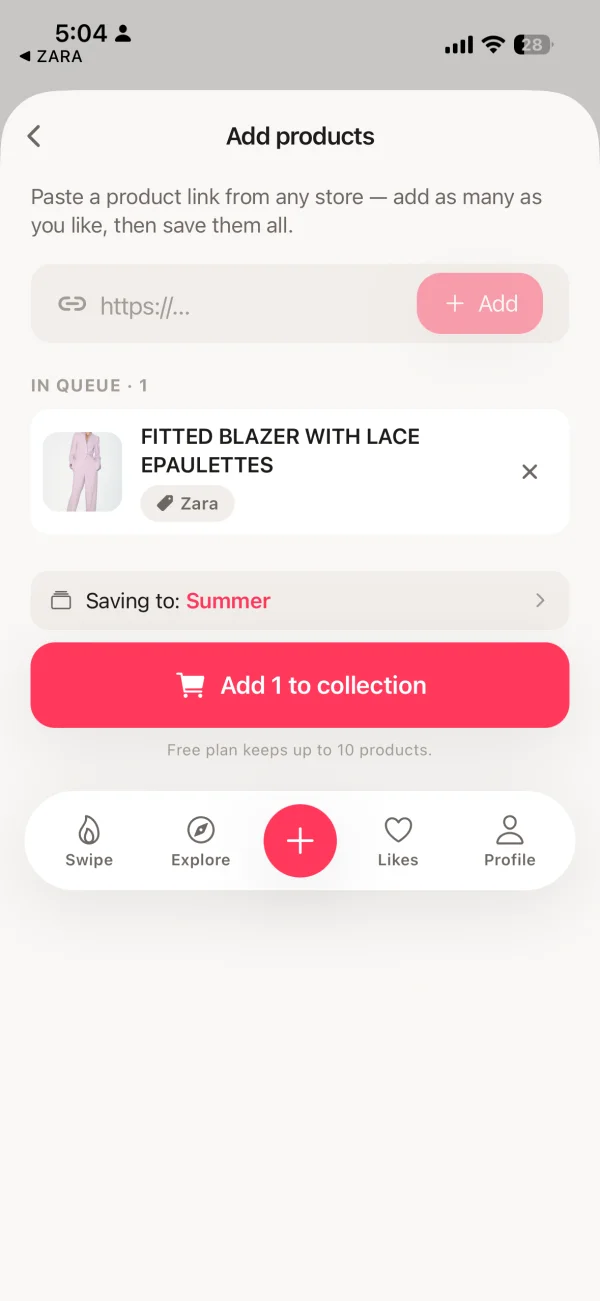
Step 3: paste any product URL from any store to save it to Spree.
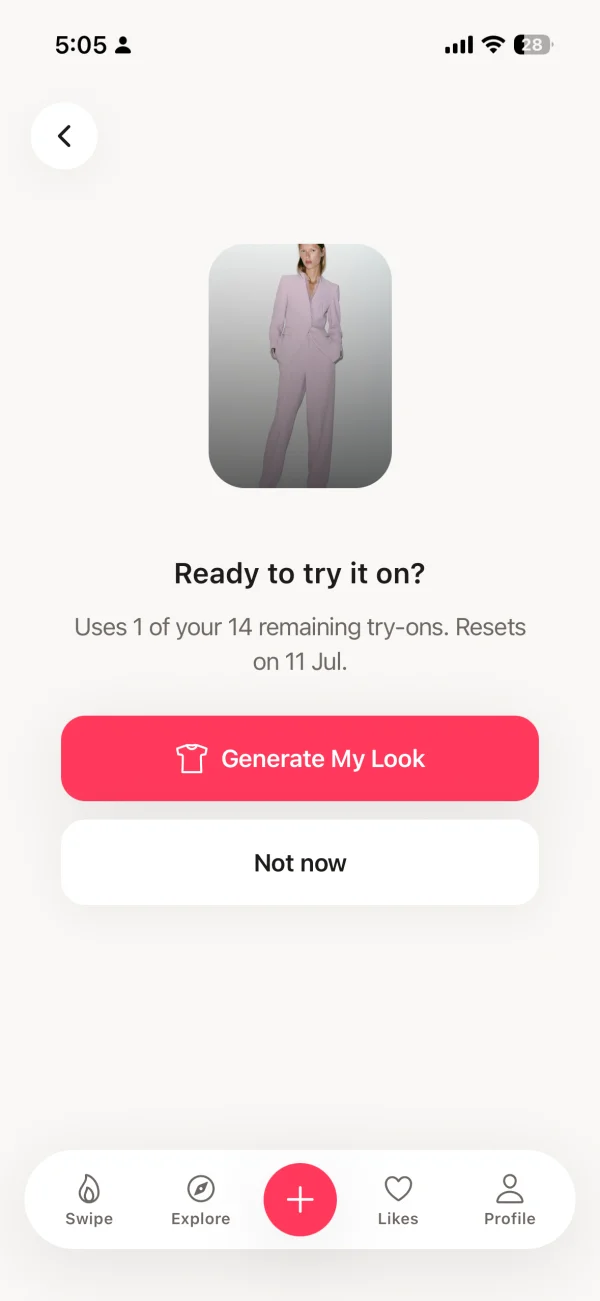
Step 6: AI generates a try-on image of you wearing the item within seconds.
Does Virtual Try-On Actually Reduce Returns?
Yes, and the evidence is strong. Retailers using AI virtual try-on report 64% fewer returns compared to those relying on standard product photography (Rewarx, 2026). That's a reduction large enough to meaningfully change the economics of online fashion for both shoppers and stores.
Amazon's own data adds more context. Shoppers who used Amazon's virtual try-on feature converted at 2.4 times the rate of those who didn't (Amazon, 2025). Higher conversion and fewer returns together suggest the technology genuinely improves confidence in the purchase decision. McKinsey's 2025 retail analysis found that returns cost the global fashion industry over $600 billion annually in logistics, processing, and restocking.
The mechanism is straightforward. Most returns happen because the item didn't match the shopper's mental image of how it would look on them. Try-on replaces that mental image with an actual AI-generated preview. It can't replicate the feel of fabric, but it answers the appearance question that drives most returns.
Which Stores Can I Virtually Try On Clothes From?
With Spree, you can try on items from any online store that has a product URL. That means Amazon, ASOS, Zara, H&M, Nike, Net-a-Porter, Shein, and 1,000+ other retailers. You're not limited to a curated brand list or a single store's catalog.
Most other virtual try-on tools are either retailer-specific (Amazon's feature only works on Amazon, ZARA AR only works in the ZARA app) or limited to brands that have built partnerships with the platform. Spree's URL-import approach bypasses that constraint entirely. If a store has a product page with a URL, you can save and try on that item.
Tips for the Best Virtual Try-On Results
[PERSONAL EXPERIENCE] Through testing the AI try-on across hundreds of garment types, we've found that the photo quality you provide makes the single biggest difference in result accuracy. The AI can only work with what you give it.
- Use a clear full-body photo. The AI needs to see your full silhouette to accurately place and drape the garment. Cropped or partial photos reduce accuracy.
- Good lighting matters. Natural daylight or bright indoor lighting gives the AI enough detail to read your body contour. Dark photos produce flat, less accurate results.
- Plain background works best. A neutral wall or clean space helps the AI separate your body from the environment. Busy or cluttered backgrounds can create visual noise.
- Wear form-fitting clothes in your reference photo. Loose or bulky clothing in your personal photo makes it harder for the AI to read your body shape accurately.
- Try multiple colorways. If a garment comes in several colors, save each colorway separately in Spree and try them all on. Color affects how a piece reads on your specific skin tone.
- Check product images before saving. High-quality product photos give the AI more detail to work with. Zoom in on the retailer's page to verify image quality before saving to Spree.
Frequently Asked Questions
Can I really try on clothes before buying online?
What is the best app to try on clothes before buying?
Is virtual try-on accurate enough to replace a changing room?
Can I try on clothes from any store before buying?
How do I take a good photo for virtual try-on?
Is trying on clothes virtually free?
Try On Clothes Before You Buy
Upload your photo. Paste any product link. See how it looks on you in seconds. Free on iPhone, no ads.
Download Spree FreeWorks with Amazon, ASOS, Zara, H&M, Nike, and 1,000+ stores. iOS only.