Can You Really Try On Clothes Virtually from Home?
Yes, and it works better than most people expect. The technology has improved fast, and the results are useful for real purchase decisions. The global virtual try-on market reached $15.29 billion in 2026 (The Business Research Company, 2026), which reflects how seriously the industry is taking this, not just as a novelty, but as a genuine shopping tool.
There are two distinct approaches, and knowing the difference helps you pick the right tool. The first is AR overlay: a garment is mapped onto your live camera feed in real time. This works well for shoes and accessories, where the geometry is predictable, but less well for draped fabric and complex silhouettes. The second is AI image synthesis: you upload a still photo of yourself, and the AI generates a new image showing you wearing the item. This approach handles fabric, shadows, and body contour more realistically, because it's not constrained by real-time processing. For serious fashion decisions at home, AI synthesis gives better results.
What You Need to Try On Clothes Virtually at Home
The requirements are minimal. You don't need special hardware, a ring light, or a professional photo. Here's the complete list.
- 1 iPhone with iOS 16 or later. Any model from iPhone 8 onwards works. The AI processing happens in the cloud, not on your device.
- 2 One clear photo of yourself. Full-body is best. Natural light, simple background. You only need one photo, reused for every try-on.
- 3 A product URL from any online store. Copy the link from any store's product page. That's it. No screenshots required.
- 4 The Spree app. Free to download on the App Store. AI try-on is included in Pro at $7.99/month or $49.99/year.
How to Virtually Try On Clothes at Home with Spree
The full process takes under two minutes the first time. After your photo is saved, each try-on takes about 30 seconds. Here are the steps.
Download Spree free from the App Store
Search for Spree on the App Store, or go to tryspree.app. The app is free. No payment required to start. Create an account in under a minute.
Upload a photo of yourself
When you open the try-on flow for the first time, Spree asks for your photo. Choose a full-body shot with good lighting and a plain background. You can update this photo anytime from your profile settings.
Save any product via URL or iOS Share Sheet
Find the item you want in any store's app or website. Either paste the product URL directly into Spree, or tap Share in Safari and choose Spree from the share sheet. No screenshots, no manual copying.
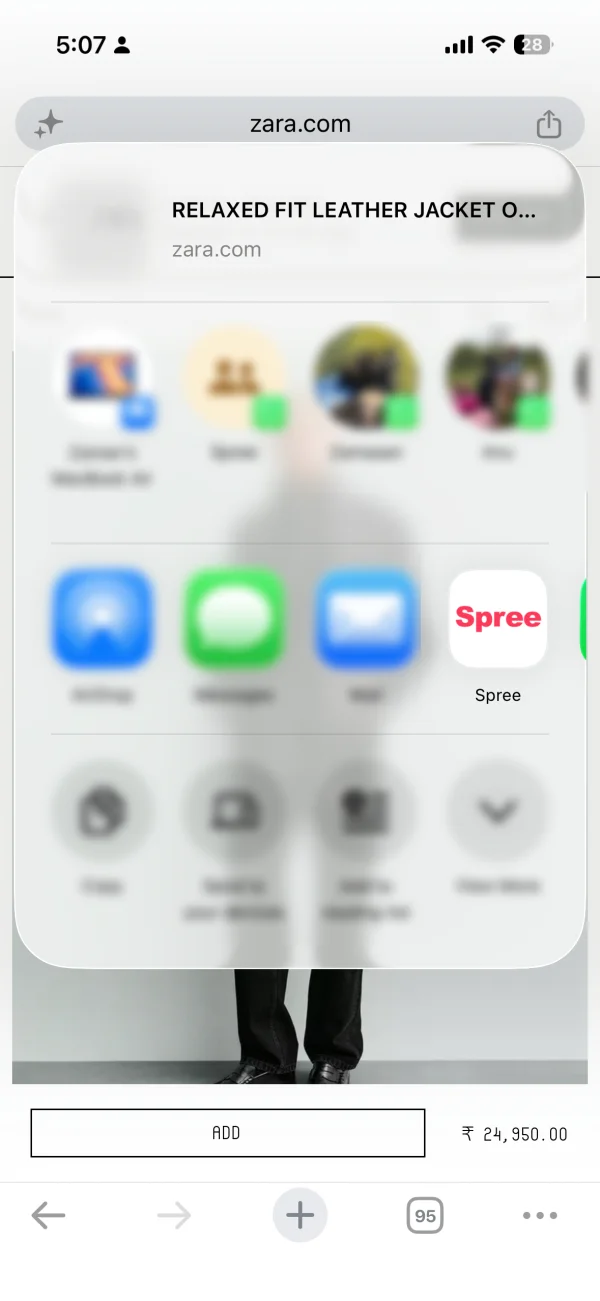
Share directly from Safari using the iOS Share Sheet. No screenshots needed.
Tap the item, then tap Try On
Open any saved item in your Spree collection. Tap the Try On button. The AI pairs your photo with the product image and begins generating the result. This typically takes 10-20 seconds.
See the result and decide
The generated try-on image appears in your wishlist alongside the product details. You can compare multiple items you've tried on, swipe to rank them, and share the result before buying anything.
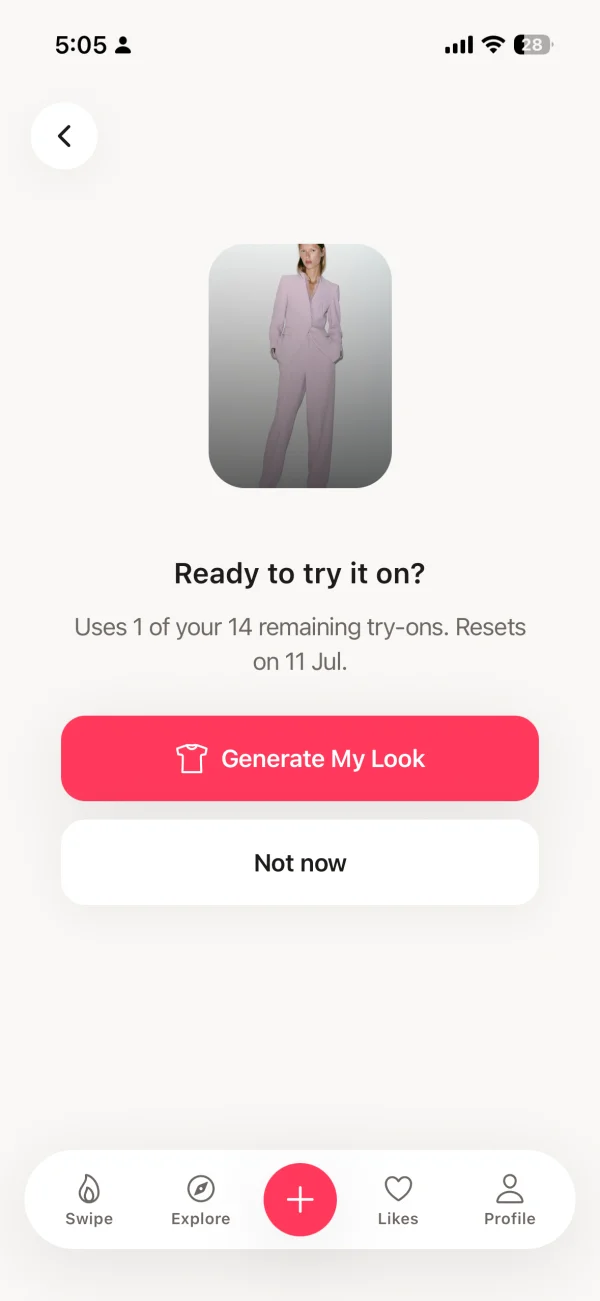
The AI try-on result sits in your wishlist. Compare items before you buy.
Which Stores Can You Virtually Try On Clothes From?
With Spree, you can try on clothing from any online store. This is the key distinction from retailer-specific tools. Amazon's virtual try-on only works on Amazon. Zara's AR only works in the Zara app. Snapchat's try-on features require brands to have built dedicated AR lenses. Spree works with any product page that has a URL. According to McKinsey (2025), shoppers visit an average of 4.2 different online stores per fashion purchase journey, which means retailer-locked tools cover a fraction of your actual browsing.
[UNIQUE INSIGHT] The real advantage of a store-agnostic tool is that it lets you make a fair comparison. You can save a jacket from ASOS, a nearly identical one from H&M, and a third from Zara, try them all on in Spree, and pick the one that actually looks best on you rather than the one that looks best on a generic model. No retailer-built tool can offer that.
Virtual Try-On at Home vs. In-Store: Does It Actually Help?
The evidence says yes, clearly. Retailers using AI virtual try-on report 64% fewer returns than those relying only on product photography (Rewarx, 2026). Fashion return rates run at 30-40% of all online purchases, compared to about 9% in-store (Shopify, 2023). The gap is entirely about the visual confirmation that only an in-person mirror or AI try-on can provide.
| Factor | Virtual Try-On at Home | In-Store Changing Room |
|---|---|---|
| Works with any store's inventory | Yes, any URL | Only in-stock items |
| Available 24/7 | Yes | Store hours only |
| No travel or queue | Yes | No, travel required |
| Feel of the fabric | Not yet | Yes |
| Compare 10+ items at once | Yes, side by side | Limited by what's in stock |
| Share results with friends | Yes | Requires a photo in-store |
Virtual try-on at home doesn't replace the tactile experience of holding a garment. But it does answer the visual questions that cause most returns: does this color work for me, does this silhouette flatter my proportions, does this style suit how I actually dress? Those are the questions that an online product page simply can't answer.
What Makes a Good Photo for Virtual Try-On?
Your photo is what the AI uses to understand your body, so it matters more than most people realize. A better photo gives the model more to work with, and the results are noticeably more accurate. [PERSONAL EXPERIENCE] We've tested hundreds of photo combinations and found that these four factors make the biggest difference.
One more practical tip: stand up straight with your arms slightly away from your sides. This gives the AI a clean reading of your shoulder width, waist, and hip proportions. The better your photo, the more closely the try-on result will match how the garment would actually look on you.
Frequently Asked Questions
Can you try on clothes virtually at home for free?
Yes. The Spree iPhone app is free to download and includes product importing from any store, wishlisting, and collection management at no cost. The AI Virtual Try-On feature is included in Spree Pro at $7.99 per month or $49.99 per year. There are no ads and no data selling on any plan, so downloading the app costs nothing and you can explore before committing to a subscription.
What app lets you virtually try on clothes at home?
The Spree app for iPhone lets you virtually try on clothes at home from any store. Save a product by pasting its URL or sharing it from Safari, upload a photo of yourself, then tap Try On. The AI generates an image showing the garment on your actual body. Unlike Amazon or Zara's try-on tools, Spree works with any store's catalog. See the full comparison of AI try-on apps for iPhone.
Does virtual try-on at home work for all body types?
Yes. Spree's AI virtual try-on generates results based on your uploaded photo, which captures your actual body proportions, not a preset template. The technology works across different body types and sizes. Results are most accurate when you use a clear, well-lit, full-body photo with a simple background and fitted neutral-colored clothing in your photo so the AI can read your silhouette clearly.
How accurate is virtual try-on at home?
Accurate enough to be genuinely useful for purchase decisions. Retailers using AI virtual try-on report 64% fewer returns compared to those relying only on product photos (Rewarx, 2026). The technology excels at checking color compatibility, silhouette, and overall style fit. Structured garments like jackets and fitted tops produce the most realistic results. Loose knitwear is harder for current models to render with full precision.
Can I try on clothes from any store virtually?
Yes, with Spree. Most other virtual try-on tools are locked to one retailer. Amazon's try-on works only on Amazon. Zara's AR only works in the Zara app. Spree works with any online store: paste a product URL from Amazon, ASOS, Zara, H&M, Nike, Net-a-Porter, Shein, Mango, or over 1,000 other stores, and you can try it on at home. See our guide to saving products from multiple stores.
What iPhone do I need for virtual try-on?
Any iPhone running iOS 16 or later works with Spree and its AI virtual try-on feature. This covers iPhone 8 and all newer models. You don't need the latest hardware. The AI image processing happens in the cloud rather than on your device, so your iPhone's chip generation matters less than having a reasonably current iOS version installed.
The Short Version
Virtual try-on at home is real, it works, and it's free to start. The data backs it up: 72% of fashion returns trace back to fit problems, and AI try-on cuts retailer return rates by 64%. The barrier to trying it is low. You need an iPhone, one decent photo of yourself, and the Spree app.
The one thing worth getting right before your first try-on: your photo. Good light, plain background, full-body shot. That single investment pays off every time you use the feature, because the same photo works for every item you try on going forward.